Choose the Right Sensor Switching Warning Projector
A sensor switching beacon light combines an industrial projector with an external trigger or recognition input. Instead of displaying the same image continuously, the system can activate, rotate or change a projected warning when a defined event occurs. Typical applications include forklift passages, roll-up doors, overhead crane routes, loading bays and restricted factory areas.
Trigger and Control Options
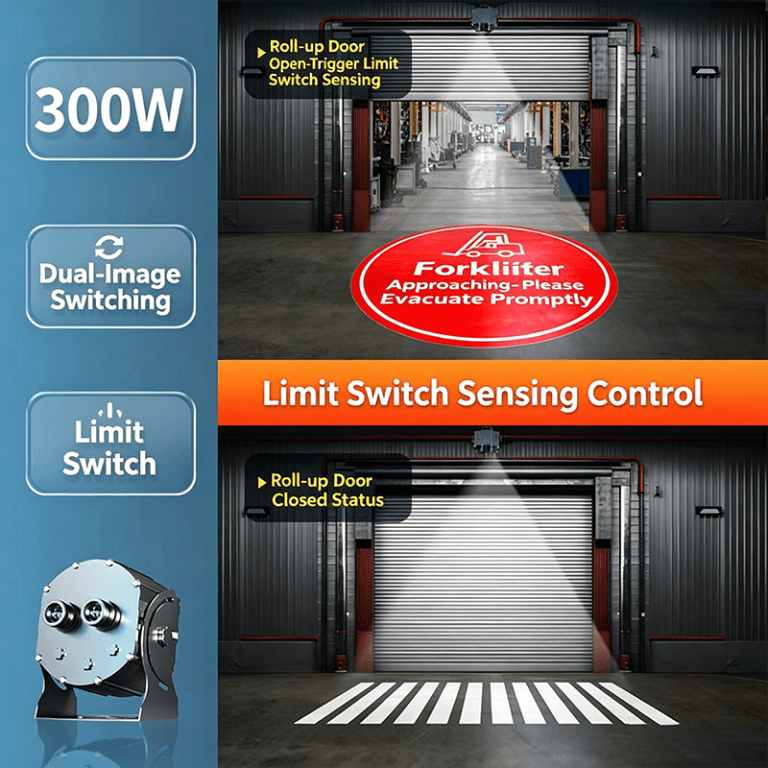
- Limit-switch sensing: suitable when a door, crane or machine position provides a clear mechanical open/closed or active/inactive signal.
- Camera or vision recognition: an optional project-reviewed control input for detecting a defined scene or operating condition. Detection logic, environment and integration requirements must be confirmed before production.
- Infrared human-body sensing: useful for activating a warning when personnel enter a monitored approach or passage area.
- External control module: can coordinate image switching, trigger delay, reset timing and optional audible alerts according to the site workflow.
Project-Based Power and Display Configurations
| Configuration | Typical capability | Best suited to |
|---|
| 160W | Rotating or carousel-style projection, including multi-image projects | Crane routes and changing area warnings |
| 200W | Dual-image switching with a custom control module | Door states, machine states and passage control |
| 300W | Single- or dual-image control with limit-switch, camera or infrared trigger options | Larger factory areas and longer projection requirements |
These wattages and switching functions are project configuration references, not universal stock specifications. Final power, lens, pattern quantity, controller and trigger compatibility are confirmed after the installation details are reviewed.
Image Switching and Audible Alerts
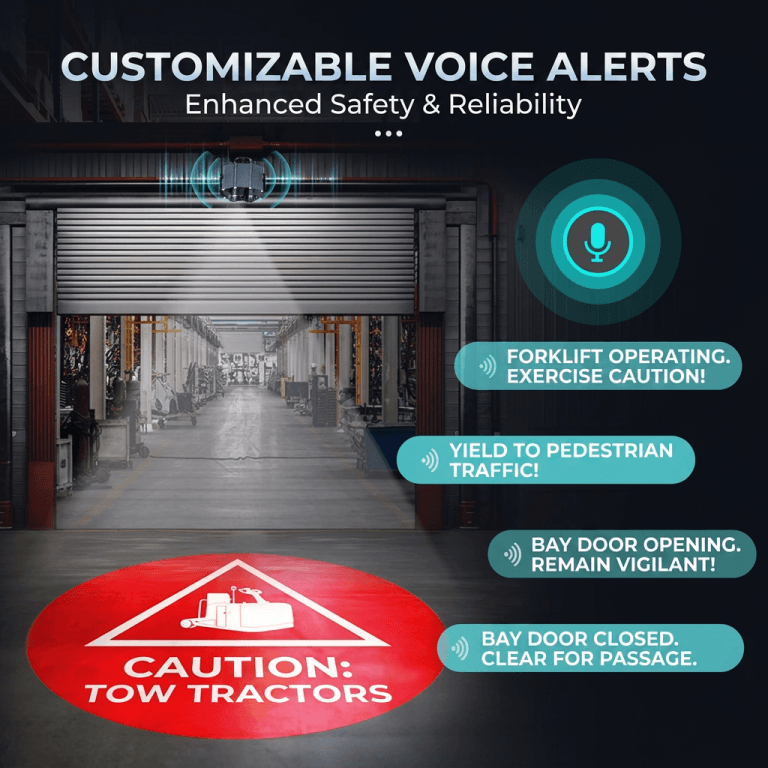
Depending on the project, the projector can switch between two warning images, rotate through up to four patterns or display a selected image only when the trigger is active. A custom recorded voice prompt or buzzer alarm can be added when an audible cue is required alongside the floor or wall projection.
Typical Industrial Workflows
- Project a pedestrian caution symbol when a forklift approaches a crossing.
- Change between OPEN, CLOSED or KEEP CLEAR graphics as a bay door moves.
- Activate a crane or hoist warning pattern during equipment operation.
- Display a restricted-area warning when a person enters a monitored zone.
Information Needed Before Quotation
Please provide the trigger method, supply voltage, mounting position, projection distance, target image size, ambient light level, required pattern quantity, audible-message requirement, control I/O and preferred reset delay. Also explain the intended safe state, manual override and what should happen if the sensor or control signal is lost.
Frequently Asked Questions
Can one projector show different warnings?
Yes. Dual-image switching and multi-image carousel configurations are available for suitable projects. The number of patterns and switching sequence depend on the projector and controller selected.
Which sensing method should I choose?
Use a limit switch when equipment position provides a reliable physical signal, infrared sensing for personnel presence in an appropriate monitored area, or a project-reviewed camera input when scene recognition is necessary.
Can the warning include sound?
Optional buzzer or custom voice alerts can be integrated with selected configurations. Provide the required message, sound timing and site noise conditions for confirmation.
Does the projector replace machine safety controls?
No. A projected warning is a supplemental visual aid. It does not replace guarding, interlocks, lockout/tagout, access control, training, audible alarms, a site risk assessment or compliance with applicable machinery and workplace-safety requirements.